
Docs
Troubleshooting
Fixes for sign-in, integrations, missing conversations, and how to report bugs.
Find Help
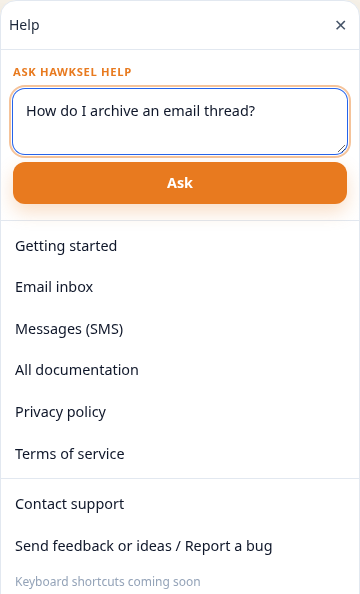
Open the vertical Help tab on the right edge of the dashboard (or More → Help on mobile). From there you can:
- Ask product how-tos in Ask HawkSel Help (not billed to your org)
- Open docs links, contact support, or Send feedback / Report a bug
Cannot sign in
- Confirm you are using the invite email address.
- Request a password reset if available, or ask an admin to resend the invite from Users.
- Clear cookies for the dashboard domain and retry.
- If you belong to multiple organizations, confirm you are opening the correct dashboard URL.
Integration shows Inactive or Error
- Open More → Settings → Integrations.
- Open the integration and follow Connect / reconnect.
- Interpret status pills:
- Inactive — not set up yet (often normal)
- Error — credentials, OAuth, or webhooks need attention
- Active — connected
- After fixing, send a test message or use Sandbox.
Agent answers are wrong or empty
- Search Knowledge Base for the topic; add or correct an entry.
- Review Settings → Agent tools and policies.
- Retest in Sandbox.
- On Messages/Email, confirm the thread is not AI off / stop AI response.
Email or SMS not appearing
- Confirm the correct organization context.
- On Email, check Shelves chips (Active vs Arch / Ignored / Del).
- Verify Gmail / phone integrations show Active.
- Refresh; realtime updates need a live connection. Search if you know a subject or phone.
Send feedback / Report a bug
- Open the Help edge tab (web) or More → Help (mobile).
- Choose Send feedback or ideas / Report a bug.
- Pick Bug report, Idea, or Other.
- Describe steps, expected vs actual behavior, and approximate time.
- On web you can attach a screenshot; include the page you were on.
You can also use Contact support from Help, or ask Ask HawkSel Help for product how-tos first.